

Businesses continue searching for ways to improve efficiency, strengthen visibility, and support future growth. Enterprise Resource Planning (ERP) systems play a central role in achieving those goals. For organizations that have relied on Microsoft Dynamics GP for many years, the time has arrived to evaluate the next phase of their ERP journey.
Microsoft’s continued investment in cloud technologies has encouraged companies across industries to embrace modern business applications. Among those solutions, Microsoft Dynamics 365 Business Central has emerged as a leading choice for organizations seeking greater flexibility, automation, and connected business processes.
Migrating from Dynamics GP to Business Central delivers more than a technology update. It creates opportunities to simplify operations, improve collaboration, gain real-time insights, and support growth through a cloud-based platform designed for modern business needs.
According to Fortune Business Insights, the global ERP software market reached approximately USD 92.6 billion in 2025 and continues to expand as organizations invest in digital transformation initiatives. At the same time, cloud-based ERP adoption continues growing as businesses pursue greater accessibility, security, and operational efficiency.
This guide explores everything organizations need to know about planning a successful migration from Dynamics GP to Business Central. From understanding Microsoft’s support timeline to evaluating migration benefits and preparing a practical roadmap, every step contributes to a smooth and successful transition.
Dynamics GP Support Timeline and What It Means for Businesses:
Every technology platform follows a lifecycle. Understanding Microsoft’s support roadmap helps organizations make informed decisions regarding future ERP investments.
As businesses plan for growth, visibility into support timelines provides valuable guidance for budgeting, resource planning, and technology modernization initiatives.
Understanding Microsoft’s Support Roadmap:
Microsoft has announced important milestones regarding Dynamics GP support.
Organizations currently using Dynamics GP continue receiving support and updates through Microsoft’s established lifecycle schedule. Mainstream support remains available through December 31, 2029, while security updates continue through April 30, 2031.
These dates provide businesses with a valuable opportunity to create a thoughtful migration strategy while avoiding unnecessary pressure.
Recent research from Gartner indicates that organizations increasingly prioritize cloud-based business applications as part of broader modernization efforts. Many ERP decision-makers now focus on platforms that receive continuous innovation, regular enhancements, and integrated AI capabilities.
Key Support Milestones
- Mainstream Support Through 2029: Provides access to product updates, maintenance support, and ongoing assistance.
- Security Updates Through 2031: Supports business continuity and security requirements during transition planning.
- Long-Term Planning Window: Gives organizations time to evaluate requirements and create a migration roadmap aligned with business objectives.
Evaluating Business Opportunities Through ERP Modernization:
Technology investments create the strongest value when they align with business goals.
Many organizations view ERP modernization as an opportunity to improve operational performance rather than simply replacing existing software.
Business Central offers capabilities that help organizations:
- Improve Data Visibility: Teams gain access to real-time information across finance, sales, purchasing, inventory, and operations.
- Enhance Collaboration: Employees work more effectively through integration with Microsoft 365 applications.
- Support Remote Accessibility: Users access business information securely from virtually any location.
- Increase Process Automation: Routine activities become more efficient through automated workflows.
- Strengthen Decision-Making: Real-time reporting supports faster and more informed business decisions.
Planning ERP Modernization Before Critical Deadlines:
Successful ERP projects begin with preparation.
Organizations that start planning early often benefit from additional flexibility when evaluating requirements, budgets, timelines, and business priorities.
Early planning also creates opportunities to:
- Review Existing Processes: Identify opportunities to improve workflows and eliminate manual tasks.
- Evaluate Current Customizations: Determine which features continue supporting business goals.
- Align Technology with Growth Plans: Ensure the new system supports future expansion.
- Prepare Teams for Change: Encourage user engagement and successful adoption.
- Create a Phased Roadmap: Establish clear milestones that support project success.
Many organizations discover that the migration journey creates value long before go-live. Process reviews, workflow improvements, and strategic planning often generate meaningful operational improvements throughout the project lifecycle.
Why Businesses Continue Choosing Business Central for ERP Modernization:
Organizations evaluating ERP solutions frequently seek a platform that combines flexibility, functionality, and long-term innovation.
Microsoft Dynamics 365 Business Central meets those expectations through cloud-based capabilities, seamless Microsoft integration, and advanced business management features.
Businesses across manufacturing, distribution, agriculture, professional services, and nonprofit sectors continue selecting Business Central because it supports operational excellence while remaining accessible and scalable.
Expanding Operational Flexibility Through Cloud Access:
Cloud technology has transformed the way businesses operate.
Business Central provides secure access to critical information from desktops, tablets, and mobile devices. Teams can collaborate efficiently whether they work from headquarters, branch offices, warehouses, production facilities, or remote locations.
Benefits of Cloud Accessibility
- Anywhere Access: Authorized users connect securely from virtually any location.
- Automatic Updates: Businesses gain access to new capabilities through Microsoft’s ongoing enhancements.
- Reduced Infrastructure Requirements: Cloud hosting simplifies technology management.
- Business Continuity Support: Secure cloud environments support operational resilience.
- Scalable Growth: Organizations expand users and capabilities as requirements evolve.
This flexibility allows businesses to focus more attention on strategic priorities and customer service while reducing administrative complexity.
Strengthening Productivity Through Microsoft Ecosystem Integration:
One of Business Central’s greatest advantages comes from its connection to Microsoft’s broader technology ecosystem.
Instead of working across disconnected systems, employees can access information through familiar applications they already use every day.
Key Microsoft Integrations
- Microsoft 365: Connect Outlook, Excel, Teams, and other productivity applications directly to business data.
- Power BI: Create interactive dashboards and visual reports for faster decision-making.
- Power Apps: Build custom business applications tailored to specific operational requirements.
- Microsoft Azure: Support secure cloud infrastructure and advanced technology services.
- Microsoft Copilot: Enhance productivity through AI-assisted insights and recommendations.
These integrations help create a connected business environment where information flows efficiently across departments.
Accelerating Decision-Making Through Real-Time Visibility:
Business leaders depend on accurate information when making strategic decisions.
Business Central provides real-time access to financial performance, inventory status, customer activity, purchasing trends, and operational metrics.
Instead of waiting for reports, teams gain immediate access to the information needed to support daily decisions.
Advantages of Real-Time Visibility
- Improved Financial Reporting: Access current financial information throughout the organization.
- Enhanced Inventory Management: Monitor stock levels and purchasing activity in real time.
- Better Customer Insights: Understand sales trends and customer activity more effectively.
- Faster Response Times: Act quickly when opportunities emerge.
- Stronger Forecasting: Support future planning with accurate business information.
Supporting Long-Term Growth Through a Modern ERP Platform:
Growth often introduces new complexities.
Additional customers, products, locations, employees, and processes require systems capable of supporting expansion efficiently.
Business Central provides a foundation that grows alongside the organization.
Growth-Oriented Advantages
- Flexible User Expansion: Add users as business requirements evolve.
- Multi-Entity Support: Manage multiple companies and locations efficiently.
- Advanced Reporting Capabilities: Support executive decision-making through detailed analytics.
- Industry Adaptability: Configure processes to align with unique operational requirements.
- Continuous Innovation: Benefit from Microsoft’s ongoing investment in ERP technology.
Organizations choosing Business Central gain access to a platform designed to support both current operations and future business goals.
Explore Your Business Central Opportunities
Dynamics GP vs Business Central Comparison Across Key Business Functions
Choosing the right ERP platform requires a clear understanding of how each solution supports daily operations, long-term growth, and business efficiency. Many organizations have relied on Dynamics GP for years, and it has delivered value across finance, inventory, purchasing, and reporting.
Business Central builds on those foundations while introducing cloud-based capabilities, AI-powered tools, automation, and deeper integration across Microsoft’s business applications.
A side-by-side comparison helps business leaders identify the opportunities available through modernization.
Comparing Financial Management Capabilities:
Financial management remains one of the most important areas of any ERP system. Business leaders depend on accurate reporting, forecasting, budgeting, and cash flow visibility to support strategic decisions.
Dynamics GP provides solid financial management functionality, while Business Central expands those capabilities with real-time access and automation.
Financial Management Comparison
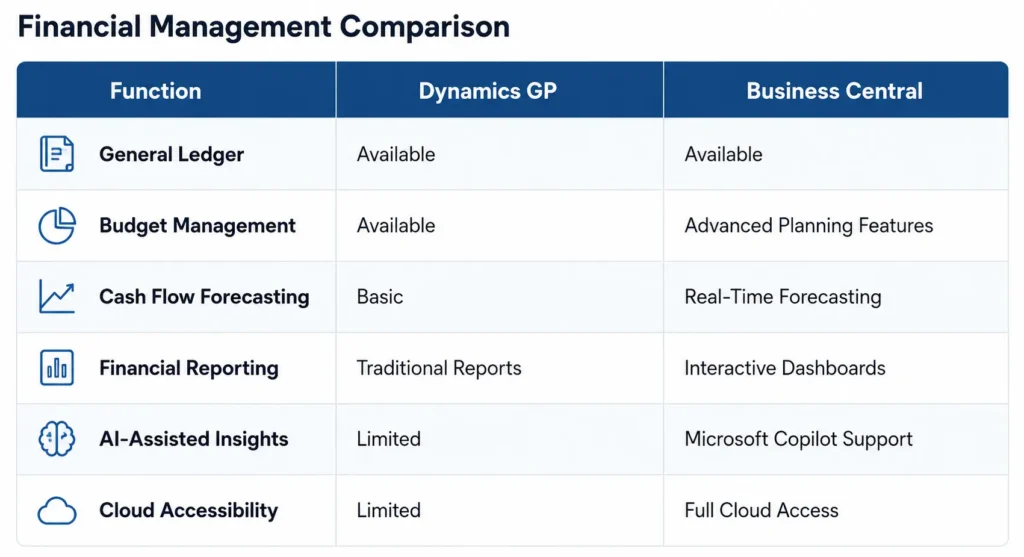
Key Financial Advantages
- Real-Time Financial Visibility: Business Central provides immediate access to financial performance data across departments.
- Automated Processes: Recurring transactions, approvals, and workflows help improve efficiency.
- Improved Forecasting: Financial planning becomes more accurate through enhanced reporting capabilities.
- Executive Dashboards: Leadership teams gain a clear view of performance metrics and trends.
Comparing Inventory and Supply Chain Functionality:
Inventory management plays a critical role in maintaining operational efficiency and customer satisfaction.
Business Central helps organizations manage inventory, purchasing, warehousing, and supply chain activities through connected workflows and real-time visibility.
Inventory and Supply Chain Benefits
- Enhanced Inventory Tracking: Teams monitor stock levels and movement more efficiently.
- Purchasing Optimization: Purchasing decisions become more informed through accurate demand visibility.
- Warehouse Coordination: Inventory transfers and fulfillment processes become easier to manage.
- Supply Chain Insights: Business leaders gain greater awareness of inventory trends and operational performance.
Business Central Strengths
Organizations often discover greater efficiency through:
- Automated replenishment planning
- Real-time inventory availability
- Integrated purchasing workflows
- Multi-location inventory management
- Improved demand forecasting
Comparing User Experience and Accessibility:
Technology adoption often depends on user experience.
Employees prefer systems that simplify daily tasks and provide easy access to information. Business Central offers a modern interface designed to improve productivity and support user engagement.
User Experience Improvements
- Familiar Microsoft Environment: Employees work within applications they already recognize.
- Simplified Navigation: Users access information quickly and efficiently.
- Mobile Accessibility: Teams stay connected through smartphones and tablets.
- Personalized Dashboards: Users customize views according to their responsibilities.
- Faster Information Access: Key data remains available through role-based dashboards.
Many organizations report increased user satisfaction after transitioning to modern cloud ERP systems due to improved usability and accessibility.
Comparing Scalability and Future Readiness:
Every business seeks technology that supports future growth.
As organizations expand operations, add locations, launch products, or enter new markets, their ERP platform should support those goals without requiring significant infrastructure investments.
Business Central offers flexibility designed to support evolving business requirements.
Future Growth Advantages
- Cloud-Based Expansion: Add users and capabilities as requirements grow.
- Continuous Innovation: Benefit from Microsoft’s ongoing product enhancements.
- AI-Powered Productivity: Leverage Microsoft Copilot to improve efficiency.
- Multi-Company Management: Support complex business structures through a single platform.
- Integration Flexibility: Connect with Microsoft applications and third-party solutions.
The combination of cloud accessibility, automation, reporting, and AI capabilities positions Business Central as a strong foundation for future business success.
Which Business Data Moves During a GP to Business Central Migration?
Data migration represents one of the most important stages of an ERP transition. Business leaders often want assurance that valuable business information remains protected and accessible throughout the process.
A well-planned migration strategy helps ensure data quality, operational continuity, and long-term success.
The good news is that a significant portion of business-critical information can transfer from Dynamics GP to Business Central through structured migration frameworks and proven methodologies.
Migrating Financial Records and Transaction History:
Financial information serves as the foundation of every ERP system.
Organizations rely on historical financial records for reporting, compliance, forecasting, and business planning.
Common Financial Data Categories
- General Ledger Accounts: Core financial structures transfer into Business Central.
- Accounts Receivable Data: Customer balances and payment information remain available.
- Accounts Payable Records: Vendor transactions and outstanding balances move into the new environment.
- Banking Information: Financial reconciliation processes continue smoothly.
- Fixed Asset Records: Asset management data supports ongoing operations.
Maintaining financial continuity helps organizations preserve reporting accuracy while supporting future planning initiatives.
Migrating Customer and Vendor Information:
Customer and vendor records represent valuable business assets.
Accurate master data supports sales activities, purchasing processes, customer service, and financial operations.
Customer and Vendor Data Categories
- Customer Master Records: Contact information, account details, and transaction history.
- Vendor Information: Supplier profiles, purchasing details, and payment records.
- Contact Management Data: Business relationships remain organized and accessible.
- Sales History: Historical transaction data supports future decision-making.
- Purchasing Records: Supplier performance and purchasing trends remain available.
Quality master data contributes significantly to a successful migration outcome.
Migrating Inventory and Operational Data:
Inventory and operational information directly influence business performance.
Organizations often depend on accurate inventory records to support fulfillment, purchasing, production, and customer service activities.
Inventory Data Categories
- Item Master Records: Product details transfer into Business Central.
- Inventory Quantities: Current stock balances remain accurate and accessible.
- Warehouse Information: Location-specific inventory data supports operational continuity.
- Purchasing Data: Existing purchasing records support future planning.
- Sales Information: Historical trends help improve forecasting and decision-making.
Establishing Data Governance Before Migration:
Successful migration projects begin long before data moves into a new system.
Data preparation plays a major role in overall project success.
Many organizations use the migration process as an opportunity to improve data quality and streamline information management practices.
Data Preparation Best Practices
- Review Existing Records: Evaluate current data for accuracy and completeness.
- Consolidate Duplicate Entries: Create cleaner and more reliable datasets.
- Archive Historical Information: Organize older records according to business requirements.
- Validate Critical Data: Confirm accuracy before migration begins.
- Establish Governance Standards: Create processes that support long-term data quality.
Strong data governance creates a solid foundation for Business Central and supports more reliable reporting, forecasting, and operational management after go-live.
Build Your Personalized Migration Roadmap
Step-by-Step Migration Framework for Business Central Success:
Every successful ERP migration begins with a clear plan. Organizations that follow a structured approach often achieve stronger outcomes, smoother adoption, and greater long-term value.
Migrating from Dynamics GP to Business Central involves more than moving data. It includes evaluating business processes, preparing users, configuring the new environment, and creating a foundation that supports future growth.
A proven migration framework helps organizations move forward with confidence while maintaining business continuity throughout the transition.
Assessing Current Dynamics GP Environment:
The first stage of every migration project focuses on understanding the current environment.
This assessment provides visibility into existing processes, customizations, integrations, reporting requirements, and operational workflows.
A thorough review helps identify opportunities for improvement while ensuring critical business functions receive proper attention during migration planning.
Assessment Activities
- Review Existing Modules: Evaluate finance, purchasing, sales, inventory, and operational processes.
- Analyze Customizations: Identify modifications that support daily business activities.
- Document Integrations: Review connections with third-party applications and external systems.
- Evaluate Reporting Requirements: Understand reporting needs across departments.
- Assess User Roles: Identify how employees interact with the current system.
Defining Business Objectives and Future Requirements:
Migration projects create an excellent opportunity to align technology investments with business goals.
Rather than simply recreating the existing system, many organizations use the transition to improve efficiency, strengthen visibility, and support long-term growth plans.
Key Planning Considerations
- Growth Objectives: Define how Business Central will support future expansion.
- Operational Improvements: Identify processes that can benefit from automation.
- Reporting Enhancements: Determine which business insights provide the greatest value.
- User Experience Goals: Create a simpler and more productive working environment.
- Technology Alignment: Support broader digital transformation initiatives.
Clear objectives provide direction throughout the migration process and help measure project success after deployment.
Preparing Data for Migration Readiness:
Data preparation remains one of the most important activities in any ERP migration.
Accurate, organized, and validated information supports a smoother transition and creates a stronger foundation for future operations.
Organizations frequently discover opportunities to improve data quality during this phase.
Data Preparation Activities
- Review Customer Records: Ensure information remains current and accurate.
- Validate Vendor Data: Confirm supplier information and purchasing details.
- Organize Inventory Records: Verify item information and stock quantities.
- Clean Historical Data: Improve consistency and accuracy across records.
- Establish Migration Rules: Define which information transfers into Business Central.
A well-prepared dataset contributes significantly to project success and user confidence.
Configuring Business Central for Operational Alignment:
Business Central provides extensive flexibility to support unique business requirements.
Configuration focuses on creating an environment that aligns with organizational processes while maintaining simplicity and scalability.
The goal involves supporting operations efficiently without introducing unnecessary complexity.
Configuration Areas
- Financial Management Setup: Chart of accounts, dimensions, and reporting structures.
- Sales and Customer Management: Customer workflows and order processing.
- Purchasing Operations: Vendor management and procurement processes.
- Inventory Management: Item structures, warehouse operations, and replenishment planning.
- Workflow Automation: Approval processes and business rules.
Organizations often experience immediate efficiency improvements when workflows align closely with daily business activities.
Executing Migration Testing and Validation:
Testing creates confidence before production deployment.
Every process, report, integration, and workflow should perform as expected before the final transition occurs.
Testing also provides valuable opportunities for user feedback and process refinement.
Validation Activities
- Data Verification: Confirm successful transfer of information.
- Financial Reconciliation: Validate balances and transaction accuracy.
- Process Testing: Review operational workflows across departments.
- Integration Testing: Verify communication between connected systems.
- User Acceptance Testing: Ensure employees feel comfortable using the new platform.
Research from Deloitte indicates that thorough testing often contributes to faster adoption and smoother project execution.
Delivering User Training and Change Management:
Technology success depends heavily on people.
Employees who understand the benefits of Business Central and receive practical training often adapt quickly and confidently.
Training should focus on daily responsibilities rather than technical complexity.
Effective Training Practices
- Role-Based Training: Deliver content tailored to individual responsibilities.
- Hands-On Learning: Allow users to practice common tasks.
- Department Workshops: Support collaboration across teams.
- Training Resources: Provide documentation and reference materials.
- Ongoing Support: Maintain access to assistance after deployment.
Organizations that prioritize user engagement frequently experience stronger adoption and long-term success.
Launching Production Environment with Confidence:
Go-live marks an exciting milestone in the migration journey.
Careful preparation allows organizations to move into production with confidence while maintaining operational continuity.
A structured launch plan helps teams remain focused and organized throughout the transition.
Go-Live Success Factors
- Final Data Validation: Confirm readiness before launch.
- User Readiness Assessment: Ensure employees feel prepared.
- Support Team Availability: Provide immediate assistance during deployment.
- Performance Monitoring: Track system activity and operational processes.
- Continuous Improvement Planning: Identify opportunities for future optimization.
Business Central becomes more than a replacement system. It becomes a platform that supports innovation, efficiency, and growth across the organization.
Common Migration Challenges and Practical Strategies for Success:
Every ERP project includes considerations that require thoughtful planning. Understanding potential challenges early helps organizations create effective strategies and maintain project momentum.
Experienced implementation partners play an important role in helping organizations navigate these situations while keeping business objectives front and center.
Managing Data Structure Differences:
Dynamics GP and Business Central organize information differently.
Successful migrations depend on proper data mapping and transformation processes that ensure information remains accurate and usable within the new environment.
Successful Data Mapping Practices
- Review Data Structures: Understand how information transfers between systems.
- Validate Critical Records: Confirm accuracy before migration begins.
- Test Migration Scenarios: Evaluate results before final deployment.
- Maintain Data Consistency: Support reporting accuracy and operational efficiency.
Organizations that invest in data preparation often experience smoother migration outcomes and stronger user confidence.
Modernizing Legacy Customizations:
Many Dynamics GP environments include custom processes developed over several years.
Migration projects provide an opportunity to evaluate those customizations and determine the most effective approach moving forward.
Business Central offers modern alternatives through extensions, workflows, and Microsoft Power Platform solutions.
Modernization Opportunities
- Simplify Existing Processes: Reduce complexity where possible.
- Utilize Business Central Features: Leverage built-in functionality.
- Adopt Power Platform Solutions: Extend capabilities through low-code tools.
- Improve Maintainability: Support future enhancements more efficiently.
Modern approaches often deliver greater flexibility while supporting long-term scalability.
Supporting User Adoption Throughout the Transition:
Employees play a central role in migration success.
Clear communication, practical training, and ongoing support help create a positive experience throughout the project.
User Adoption Strategies
- Share Project Goals: Help teams understand business benefits.
- Involve Key Stakeholders: Encourage participation throughout planning.
- Provide Consistent Communication: Keep users informed at every stage.
- Celebrate Milestones: Build excitement and engagement.
- Gather User Feedback: Support continuous improvement.
Strong user engagement often translates into faster productivity gains and stronger business results.
Coordinating Timelines and Business Priorities:
ERP projects involve multiple departments, priorities, and stakeholders.
Effective coordination helps organizations balance project activities with day-to-day operations.
Project Management Best Practices
- Establish Clear Milestones: Create visibility throughout the project.
- Define Responsibilities: Ensure accountability across teams.
- Monitor Progress Regularly: Address opportunities quickly.
- Align Resources Effectively: Support project success without disrupting operations.
- Maintain Executive Sponsorship: Encourage organizational alignment and support.
Organizations that follow structured project management practices frequently achieve smoother implementations and stronger business outcomes.
Migration Timelines and Cost Considerations for Business Central Projects:
One of the most common questions business leaders ask involves project timelines and investment requirements.
Every migration project follows a unique path based on organizational size, complexity, data volume, integrations, and business objectives.
Understanding the factors that influence timelines and costs helps organizations build realistic expectations and create effective project plans.
Industry-Specific Advantages Following a Business Central Migration:
Every industry faces unique operational requirements. While the core benefits of Business Central remain consistent, organizations often experience industry-specific improvements that help support efficiency, visibility, and growth.
Enhancing Manufacturing Operations Through Connected Processes:
Manufacturers rely on accurate information to manage production schedules, inventory availability, purchasing activities, and financial performance.
Business Central helps bring these processes together within a single platform.
Manufacturing Benefits
- Improved Production Visibility: Teams gain greater awareness of production activities and resource utilization.
- Better Inventory Control: Real-time inventory information supports production planning.
- Stronger Cost Management: Financial insights help track operational performance more effectively.
- Connected Departments: Finance, purchasing, inventory, and production teams work from the same information.
- Faster Reporting: Leadership teams gain timely access to business metrics.
Manufacturers often experience improved coordination and planning through integrated business processes.
Strengthening Distribution and Supply Chain Performance:
Distribution organizations depend on inventory accuracy, fulfillment efficiency, and customer responsiveness.
Business Central supports these objectives through connected workflows and real-time data access.
Distribution Advantages
- Inventory Visibility: Monitor stock levels across multiple locations.
- Order Processing Efficiency: Streamline order management activities.
- Warehouse Coordination: Improve movement of goods throughout operations.
- Purchasing Optimization: Support informed purchasing decisions.
- Customer Service Improvements: Provide accurate information during customer interactions.
These capabilities help distribution companies maintain operational efficiency while supporting growth.
Supporting Agricultural Business Growth Through Modern ERP:
Agricultural businesses often manage diverse operations that include purchasing, inventory, financial management, equipment, and supplier relationships.
Business Central helps centralize information and improve operational visibility.
Agriculture Benefits
- Financial Transparency: Access current financial information throughout the organization.
- Inventory Management: Monitor agricultural supplies and materials efficiently.
- Purchasing Control: Strengthen supplier management processes.
- Operational Coordination: Improve communication across teams.
- Business Planning Support: Utilize data-driven insights to guide future decisions.
Modern ERP technology helps agricultural businesses improve efficiency while supporting long-term objectives.
Improving Financial Management for Nonprofits:
Nonprofit organizations require strong financial oversight, reporting accuracy, and resource management.
Business Central provides tools that support transparency and accountability.
Nonprofit Advantages
- Grant Tracking: Monitor funding sources and expenditures.
- Financial Reporting: Generate accurate reports for stakeholders.
- Budget Management: Support planning and resource allocation.
- Process Automation: Improve efficiency across administrative activities.
- Compliance Support: Maintain organized financial records.
These capabilities allow nonprofit organizations to focus more attention on their mission while improving operational effectiveness.
Advancing Service-Based Organizations Through Automation:
Professional services organizations often manage projects, customer relationships, billing activities, and resource planning.
Business Central supports these requirements through integrated business processes.
Service Industry Benefits
- Project Visibility: Monitor project performance and progress.
- Resource Management: Coordinate team activities efficiently.
- Customer Management: Strengthen customer engagement.
- Financial Oversight: Track project profitability and business performance.
- Workflow Automation: Improve administrative efficiency.
A connected ERP platform creates opportunities for stronger collaboration and operational excellence.
How Microsoft Copilot Expands Business Central Capabilities:
Artificial intelligence continues to create new opportunities for productivity and efficiency. Microsoft Copilot brings AI-powered assistance directly into Business Central, helping organizations work more effectively with their business data.
Accelerating Financial Analysis Through AI Assistance:
Financial teams spend significant time reviewing reports, analyzing trends, and preparing forecasts.
Microsoft Copilot helps simplify these activities through intelligent assistance.
Copilot Financial Benefits
- Financial Summaries: Quickly review business performance data.
- Trend Analysis: Identify patterns across financial information.
- Forecasting Support: Assist with planning and budgeting activities.
- Faster Insights: Access relevant information more efficiently.
- Decision Support: Help leaders evaluate business performance.
These capabilities allow teams to spend more time on strategic activities and business planning.
Simplifying Reporting and Data Exploration:
Business data holds valuable insights when presented clearly and efficiently.
Copilot helps users interact with data using natural language requests.
Reporting Improvements
- Faster Information Retrieval: Access insights quickly.
- Simplified Report Creation: Generate reports more efficiently.
- Enhanced Data Exploration: Understand trends and performance indicators.
- Improved User Experience: Reduce complexity when working with information.
- Better Decision-Making: Support informed business choices.
AI-powered reporting helps organizations unlock greater value from their business data.
Increasing Productivity Across Business Functions:
Copilot extends beyond finance and reporting.
It supports productivity improvements across sales, purchasing, inventory management, customer service, and operational activities.
Productivity Enhancements
- Workflow Assistance: Support routine business processes.
- Content Generation: Help create business communications and summaries.
- Process Efficiency: Reduce manual effort across tasks.
- Information Access: Locate relevant data more quickly.
- Employee Productivity: Support teams throughout daily operations.
The combination of Business Central and Microsoft Copilot provides organizations with a modern platform designed for future growth.
Why Forward Dynamics Solutions Remains a Trusted Migration Partner:
Selecting the right implementation partner plays a significant role in migration success. Experience, industry knowledge, and technical expertise help organizations navigate the transition smoothly while maximizing long-term value.
Forward Dynamics Solutions supports businesses throughout every stage of the migration journey.
Delivering Structured Migration Methodologies:
Every migration project follows a proven framework designed to support efficiency and successful outcomes.
Key Advantages
- Comprehensive Assessments: Understand current environments and business requirements.
- Strategic Planning: Create clear migration roadmaps.
- Data Migration Expertise: Support accurate and secure data transfers.
- Project Governance: Maintain visibility and accountability throughout the project.
- Quality Assurance: Validate processes before deployment.
A structured methodology helps organizations move forward with confidence.
Supporting Diverse Industries Across North America:
Forward Dynamics Solutions works with organizations across multiple industries.
Industry Experience
- Manufacturing
- Distribution
- Agriculture
- Nonprofits
- Financial Services
- Professional Services
Industry expertise allows the team to align Business Central capabilities with real-world business requirements.
Extending Support Beyond Go-Live Activities:
Successful ERP adoption continues after deployment.
Forward Dynamics Solutions provides ongoing guidance to help organizations maximize the value of their Business Central investment.
Post-Go-Live Services
- User Training
- System Optimization
- Process Improvements
- Reporting Enhancements
- Ongoing Support
This long-term partnership approach helps businesses continue improving operational performance over time.
Building a Future-Ready ERP Strategy Through Business Central:
Technology investments should support both current operations and future business objectives.
Business Central provides organizations with a flexible cloud platform designed to adapt alongside evolving business needs. Through automation, real-time visibility, Microsoft integrations, and AI-powered capabilities, organizations gain access to tools that support efficiency and growth.
Modern ERP platforms help businesses respond quickly to opportunities, improve collaboration, and make informed decisions based on accurate information.
Organizations that invest in future-ready technology often position themselves for greater agility, stronger productivity, and long-term success.
Conclusion:
Migrating from Dynamics GP to Business Central represents an important step toward modernization, efficiency, and business growth.
The transition provides opportunities to improve visibility, automate processes, strengthen collaboration, and leverage Microsoft’s expanding ecosystem of business applications. With cloud accessibility, real-time insights, Microsoft Copilot capabilities, and ongoing innovation, Business Central offers a powerful foundation for future success.
A successful migration begins with careful planning, quality data preparation, user engagement, and experienced guidance. Organizations that take a structured approach often achieve stronger outcomes and greater long-term value from their ERP investment.
As support milestones continue approaching, now presents an excellent opportunity to evaluate your current environment and create a roadmap that aligns with your business goals.
Forward Dynamics Solutions stands ready to help guide every stage of the journey, from assessment and planning to implementation and optimization.
The future of ERP continues evolving. Business Central helps organizations move forward with confidence, efficiency, and a clear path toward sustainable growth.
