

Modern businesses continue seeking smarter ways to improve efficiency, strengthen customer relationships, and support long-term growth. As technology evolves, organizations increasingly invest in platforms that connect departments, automate processes, and provide real-time business insights.
Microsoft Dynamics 365 has become one of the leading business application platforms for organizations looking to modernize operations through cloud technology. By combining Enterprise Resource Planning (ERP) and Customer Relationship Management (CRM) capabilities within a connected ecosystem, Dynamics 365 helps businesses improve visibility, productivity, and decision-making.
A successful Microsoft Dynamics 365 implementation involves much more than deploying software. It requires strategic planning, business alignment, data preparation, user adoption, and continuous optimization.
Whether your organization plans to implement Dynamics 365 Business Central, Dynamics 365 Finance, Dynamics 365 Sales, Customer Service, or other applications, a structured approach creates a strong foundation for success.
In this guide, we explore the implementation process, key applications, business benefits, and practical strategies that help organizations maximize the value of their Dynamics 365 investment.
Why Organizations Continue Investing in Microsoft Dynamics 365:
Businesses operate in an environment where efficiency, agility, and customer experience play a major role in long-term success. Organizations increasingly seek platforms that help unify operations while providing greater visibility into performance.
Microsoft Dynamics 365 delivers these capabilities through a connected suite of business applications that support finance, operations, sales, customer service, supply chain management, and more.
According to Microsoft’s annual business application reports, organizations continue expanding their use of cloud-based business solutions to support productivity and operational excellence.
Supporting Business Growth Through Connected Applications:
Many organizations use multiple systems to manage finance, sales, inventory, customer relationships, and operations. This often creates information silos that make collaboration more difficult.
Dynamics 365 connects business functions through a unified platform, allowing teams to access accurate information from a centralized source.
Business Growth Advantages
- Centralized Information: Teams work from a single source of business data.
- Improved Collaboration: Departments share information more efficiently.
- Enhanced Visibility: Leaders gain a comprehensive view of operations.
- Faster Decision-Making: Real-time insights support business planning.
- Scalable Operations: The platform grows alongside business needs.
A connected business environment allows organizations to improve efficiency while creating stronger customer experiences.
Improving Productivity Through Microsoft Ecosystem Integration:
One of the strongest advantages of Dynamics 365 comes from its seamless integration with Microsoft’s broader technology ecosystem.
Employees can continue working within familiar applications while gaining access to valuable business information.
Microsoft Integration Benefits
- Microsoft Teams: Enhance collaboration and communication.
- Outlook Integration: Access customer and business information directly within email workflows.
- Excel Connectivity: Analyze and manage data efficiently.
- Microsoft Azure: Support cloud infrastructure and security requirements.
- Microsoft 365: Improve productivity through connected business applications.
These integrations help employees work more efficiently without switching between multiple systems.
Creating Greater Visibility Across Business Functions
Business leaders rely on timely information to support strategic planning and daily decision-making.
Dynamics 365 provides real-time access to operational, financial, customer, and performance data across the organization.
Visibility Improvements
- Real-Time Dashboards: Access business metrics instantly.
- Comprehensive Reporting: Generate reports across departments.
- Financial Transparency: Monitor business performance accurately.
- Customer Insights: Understand customer behavior and engagement.
- Operational Awareness: Identify opportunities for process improvements.
Research from Deloitte highlights that organizations leveraging real-time business intelligence often achieve stronger operational performance and improved decision quality.
Strengthening Operational Efficiency Through Automation:
Automation continues transforming the way businesses operate.
Dynamics 365 helps organizations automate repetitive activities, streamline workflows, and improve consistency across business processes.
Automation Benefits
- Workflow Automation: Simplify routine business activities.
- Approval Processes: Accelerate decision-making and task completion.
- Process Standardization: Improve consistency across departments.
- Reduced Administrative Effort: Allow employees to focus on higher-value work.
- Enhanced Productivity: Support efficient operations at scale.
Automation helps organizations create more efficient workflows while improving overall business performance.
Which Dynamics 365 Applications Support Different Business Requirements?
Microsoft Dynamics 365 includes a wide range of applications designed to address specific business needs. Choosing the right applications depends on organizational goals, operational requirements, and growth objectives.
Understanding the purpose of each solution helps organizations create an implementation strategy that aligns with their priorities.
Dynamics 365 Business Central for Small and Mid-Sized Businesses:
Dynamics 365 Business Central serves as a comprehensive ERP solution designed for growing organizations.
It combines finance, inventory, purchasing, sales, project management, and reporting within a single platform.
Business Central Benefits
- Financial Management: Manage accounting, budgeting, and reporting.
- Inventory Control: Monitor stock levels and inventory movement.
- Purchasing Management: Improve procurement efficiency.
- Sales Management: Streamline customer order processing.
- Project Tracking: Monitor project performance and profitability.
Business Central provides flexibility and scalability while supporting long-term growth.
Dynamics 365 Finance for Enterprise Financial Management:
Large organizations often require advanced financial capabilities that support global operations and complex reporting requirements.
Dynamics 365 Finance helps organizations manage financial performance across multiple entities and regions.
Finance Application Advantages
- Advanced Budgeting: Support financial planning activities.
- Financial Forecasting: Improve future planning accuracy.
- Regulatory Compliance: Support reporting and governance requirements.
- Multi-Entity Management: Manage complex organizational structures.
- Global Financial Operations: Support international business activities.
This application helps finance teams improve visibility, efficiency, and decision-making.
Dynamics 365 Sales for Revenue Growth:
Sales teams depend on accurate information, effective customer engagement, and streamlined processes to achieve revenue goals.
Dynamics 365 Sales helps organizations manage customer relationships throughout the sales cycle.
Sales Application Benefits
- Lead Management: Track and nurture sales opportunities.
- Opportunity Tracking: Improve pipeline visibility.
- Customer Relationship Management: Strengthen customer engagement.
- Sales Forecasting: Support revenue planning activities.
- Performance Insights: Monitor sales effectiveness.
These capabilities help sales teams build stronger customer relationships and improve business results.
Dynamics 365 Customer Service for Enhanced Customer Experiences:
Customer service plays a significant role in customer satisfaction and retention.
Dynamics 365 Customer Service helps organizations deliver consistent and efficient support experiences.
Customer Service Advantages
- Case Management: Organize customer inquiries effectively.
- Knowledge Management: Provide quick access to support resources.
- Omnichannel Support: Engage customers across multiple channels.
- Service Performance Tracking: Monitor support effectiveness.
- Customer Insights: Improve service quality through data-driven decisions.
A connected service platform helps organizations strengthen customer relationships and improve satisfaction.
Dynamics 365 Supply Chain Management for Operational Excellence:
Supply chain operations influence inventory availability, purchasing efficiency, and customer fulfillment.
Dynamics 365 Supply Chain Management provides tools that help organizations improve visibility and operational performance.
Supply Chain Benefits
- Inventory Optimization: Maintain accurate inventory levels.
- Procurement Management: Strengthen supplier relationships.
- Warehouse Management: Improve inventory movement and storage.
- Demand Planning: Support forecasting and purchasing decisions.
- Operational Visibility: Monitor supply chain performance in real time.
Organizations often experience improved efficiency through connected supply chain operations.
Dynamics 365 Field Service for Mobile Workforce Management:
Service organizations often manage technicians, schedules, customer appointments, and service delivery activities across multiple locations.
Dynamics 365 Field Service helps coordinate these activities efficiently.
Field Service Advantages
- Scheduling Optimization: Improve workforce utilization.
- Service Request Management: Track work orders effectively.
- Mobile Access: Support technicians in the field.
- Asset Management: Monitor equipment and service history.
- Customer Experience Improvements: Deliver timely and efficient service.
Field Service helps organizations improve operational coordination while enhancing customer satisfaction.
Find the Right Dynamics 365 Solution for Your Business
Dynamics 365 vs Traditional ERP and CRM Platforms:
Organizations evaluating new business applications often compare modern cloud platforms with traditional ERP and CRM systems. While legacy solutions have supported businesses for many years, today’s organizations increasingly seek flexibility, automation, scalability, and real-time visibility.
Microsoft Dynamics 365 brings together ERP and CRM capabilities within a connected cloud environment, helping organizations improve collaboration, productivity, and decision-making.
Understanding these differences helps leaders make informed technology investment decisions.
Comparing Accessibility and Cloud Capabilities:
Traditional ERP and CRM systems often rely on on-premises infrastructure that requires ongoing maintenance, upgrades, and hardware investments.
Dynamics 365 provides secure cloud-based access that supports modern work environments and business growth.
Accessibility Comparison
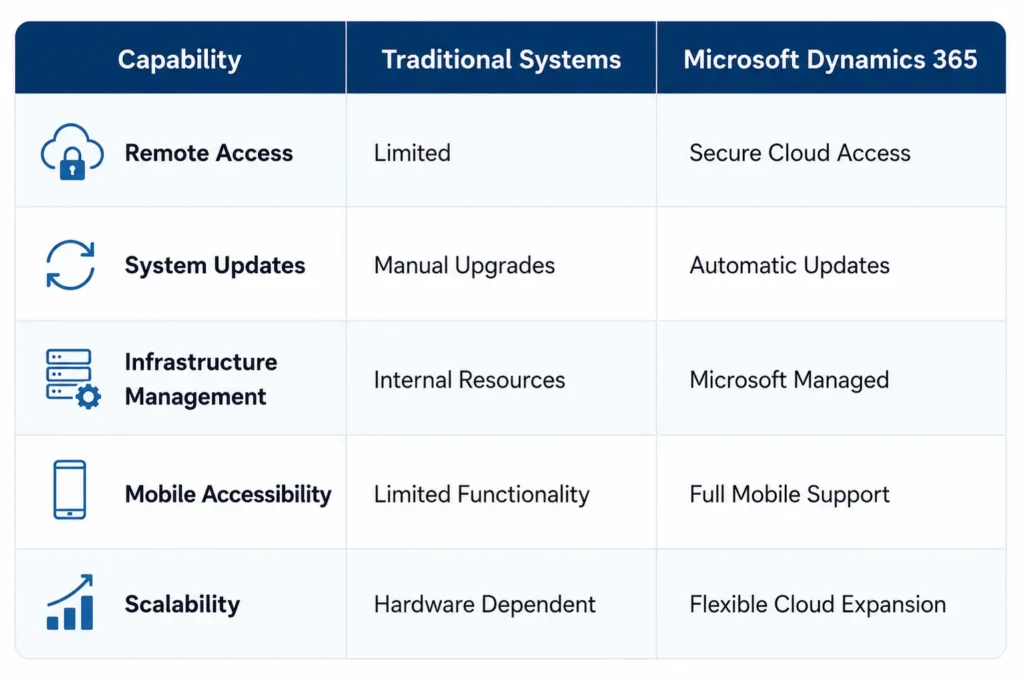
Cloud Advantages
- Anywhere Access: Employees connect securely from virtually any location.
- Reduced Infrastructure Management: Microsoft manages updates and platform maintenance.
- Greater Flexibility: Add users and capabilities as business needs evolve.
- Business Continuity Support: Cloud infrastructure supports operational resilience.
- Faster Innovation: Gain access to new features through continuous updates.
Cloud technology helps organizations focus on growth and innovation while simplifying technology management.
Comparing Reporting and Analytics Features:
Business leaders depend on timely insights to support strategic planning and daily operations.
Traditional reporting often relies on static reports and manual data collection. Dynamics 365 enhances visibility through connected reporting and real-time analytics.
Reporting Improvements
- Real-Time Dashboards: Access current business performance information.
- Interactive Reporting: Explore business data through dynamic visualizations.
- Power BI Integration: Create meaningful insights across departments.
- Automated Reporting: Reduce manual reporting effort.
- Executive Visibility: Monitor key performance indicators efficiently.
According to IDC research, organizations that embrace data-driven decision-making often experience improved operational performance and stronger business outcomes.
Comparing Scalability and Long-Term Flexibility:
Business growth often introduces new requirements, additional users, expanded locations, and evolving processes.
Technology platforms should support that growth without creating unnecessary complexity.
Scalability Benefits
- Flexible User Expansion: Add employees as the organization grows.
- Multi-Location Support: Manage operations across multiple sites.
- Multi-Entity Management: Support complex organizational structures.
- Global Business Capabilities: Manage international operations efficiently.
- Future Growth Readiness: Adapt to changing business requirements.
Dynamics 365 provides the flexibility organizations need to support growth and transformation initiatives.
Comparing Artificial Intelligence and Automation Features:
Artificial intelligence continues transforming how businesses operate.
Traditional ERP and CRM platforms often provide limited automation capabilities. Dynamics 365 incorporates AI-driven tools that help improve productivity and decision-making.
AI and Automation Advantages
- Microsoft Copilot Integration: Access AI-assisted recommendations and insights.
- Workflow Automation: Streamline repetitive business processes.
- Predictive Analytics: Support planning and forecasting activities.
- Process Optimization: Improve operational efficiency.
- Enhanced Productivity: Reduce manual effort across departments.
These capabilities help organizations create more intelligent and efficient business operations.
What Steps Support a Successful Microsoft Dynamics 365 Implementation?
Successful implementations begin with a structured approach. Organizations that invest time in planning, preparation, and stakeholder engagement often achieve stronger outcomes and faster adoption.
A well-defined implementation framework creates a clear path from planning to go-live while supporting business continuity throughout the project.
According to Panorama Consulting’s ERP research, organizations that follow structured implementation methodologies often achieve higher project success rates and stronger user adoption.
Conducting Business Discovery and Requirement Analysis:
Every implementation begins with understanding current business processes, challenges, and objectives.
The discovery phase helps establish a foundation for project planning and solution design.
Discovery Activities
- Review Existing Systems: Evaluate current ERP, CRM, and business applications.
- Identify Business Objectives: Define desired outcomes and success measures.
- Analyze Operational Processes: Understand workflows across departments.
- Gather Stakeholder Input: Engage business leaders and end users.
- Document Requirements: Create a roadmap for implementation activities.
A comprehensive discovery process helps ensure the solution aligns with business goals.
Defining Implementation Scope and Success Metrics:
Clear project scope helps maintain focus throughout the implementation journey.
Organizations benefit from establishing measurable goals and realistic expectations before project execution begins.
Planning Considerations
- Define Business Priorities: Focus on initiatives that deliver the greatest value.
- Establish Key Performance Indicators: Measure implementation success.
- Create Project Milestones: Track progress throughout deployment.
- Align Resources: Ensure appropriate staffing and support.
- Develop Governance Structures: Maintain accountability and visibility.
Well-defined objectives help guide project decisions and support successful outcomes.
Preparing Data for Migration and Validation:
Data serves as the foundation of every Dynamics 365 environment.
Preparing information before migration helps improve accuracy, consistency, and long-term usability.
Data Preparation Best Practices
- Review Existing Data: Evaluate quality and completeness.
- Remove Duplicate Records: Improve consistency across datasets.
- Validate Critical Information: Confirm accuracy before migration.
- Define Data Mapping Rules: Support smooth data transfers.
- Establish Governance Standards: Maintain data quality after deployment.
Organizations often use migration projects as an opportunity to strengthen data management practices.
Configuring Dynamics 365 for Operational Alignment:
Dynamics 365 offers flexibility that allows organizations to configure processes according to business requirements.
The goal involves creating an environment that supports operations efficiently while maintaining scalability.
Configuration Activities
- Financial Management Setup: Configure accounting structures and reporting.
- Sales Process Configuration: Support customer engagement workflows.
- Inventory Management Setup: Align inventory processes with operational needs.
- Security Role Configuration: Protect sensitive business information.
- Workflow Design: Automate routine business activities.
Proper configuration helps ensure the platform supports daily operations effectively.
Integrating Business Applications and Third-Party Systems:
Most organizations rely on multiple systems to support operations.
Integrations help create a connected environment where information flows efficiently between applications.
Integration Opportunities
- Microsoft 365 Integration: Connect productivity tools with business data.
- Power BI Connectivity: Enable advanced reporting and analytics.
- Azure Services: Support cloud infrastructure and security.
- Third-Party Applications: Connect specialized business solutions.
- Data Exchange Automation: Improve efficiency and accuracy.
Connected systems help eliminate information silos and improve collaboration.
Performing Testing and User Validation:
Testing helps ensure that processes, workflows, reports, and integrations function as expected before production deployment.
This phase provides valuable opportunities to identify improvements and gather user feedback.
Testing Activities
- Functional Testing: Verify business processes.
- Integration Testing: Confirm system connectivity.
- Data Validation: Ensure migration accuracy.
- Security Verification: Validate user permissions and access controls.
- User Acceptance Testing: Gather feedback from business users.
Thorough testing creates confidence before launch and supports smoother adoption.
Delivering User Training and Change Management:
People play a major role in implementation success.
Employees who understand the benefits of Dynamics 365 and receive practical training often adapt more quickly and confidently.
Training Strategies
- Role-Based Learning: Tailor training to individual responsibilities.
- Hands-On Practice: Allow users to work within the system.
- Department Workshops: Encourage collaboration and engagement.
- Training Resources: Provide guides and support materials.
- Continuous Learning: Support ongoing skill development.
Strong user adoption contributes directly to long-term implementation success.
Launching Production Environment with Confidence:
Go-live represents a major milestone in the implementation journey.
A structured deployment plan helps organizations transition smoothly while maintaining operational continuity.
Go-Live Success Factors
- Final System Validation: Confirm readiness before launch.
- User Readiness Assessment: Ensure employees feel prepared.
- Support Team Availability: Provide assistance during deployment.
- Performance Monitoring: Track system activity after launch.
- Continuous Improvement Planning: Identify future optimization opportunities.
Organizations that approach go-live strategically often achieve faster adoption and stronger business results.
Build Your Dynamics 365 Implementation Roadmap
What Common Implementation Challenges Require Early Planning?
Every technology project presents opportunities for improvement and learning. Microsoft Dynamics 365 implementations deliver the strongest outcomes when organizations prepare for common challenges early in the process.
A proactive approach helps teams maintain momentum, improve user confidence, and support successful project execution.
Organizations that focus on planning, communication, and stakeholder engagement often experience smoother deployments and stronger long-term adoption.
Managing Data Quality and Migration Complexity:
Data migration remains one of the most important phases of a Dynamics 365 implementation. Business decisions, reporting, customer relationships, and operational processes all depend on accurate information.
Many organizations use the implementation project as an opportunity to improve data quality and establish stronger governance practices.
Data Migration Best Practices
- Conduct Data Reviews: Evaluate existing records for accuracy and completeness.
- Remove Duplicate Entries: Create cleaner and more reliable datasets.
- Standardize Data Formats: Improve consistency across departments.
- Validate Business-Critical Records: Confirm financial, customer, and inventory information.
- Perform Migration Testing: Verify successful data transfers before go-live.
According to Gartner, organizations with strong data management practices often achieve better implementation outcomes and higher user confidence.
Aligning Customizations with Business Objectives:
Many organizations have unique processes developed over time. During implementation, it becomes important to evaluate how these requirements align with standard Dynamics 365 functionality.
Modern cloud platforms provide extensive flexibility through configuration, extensions, and Microsoft’s Power Platform.
Customization Planning Strategies
- Evaluate Existing Processes: Identify activities that support business value.
- Leverage Standard Features: Utilize built-in capabilities whenever possible.
- Adopt Low-Code Solutions: Extend functionality through Power Apps and Power Automate.
- Prioritize Scalability: Support future growth and adaptability.
- Focus on Business Outcomes: Align technology investments with organizational goals.
A balanced approach helps organizations maximize efficiency while maintaining flexibility.
Encouraging User Adoption Across Departments:
Technology delivers the greatest value when employees embrace new tools and processes.
User engagement should begin early in the implementation journey and continue through deployment and optimization phases.
User Adoption Strategies
- Communicate Project Benefits: Help employees understand the value of the new platform.
- Involve Key Stakeholders: Encourage participation throughout the project.
- Deliver Practical Training: Focus on real-world business activities.
- Gather Feedback Regularly: Create opportunities for improvement.
- Celebrate Milestones: Build enthusiasm and engagement.
Organizations that prioritize user adoption often experience faster productivity improvements after deployment.
Coordinating Project Timelines and Resources:
Successful implementations require coordination between departments, leadership teams, project managers, and technology partners.
Clear communication and governance help maintain alignment throughout the project lifecycle.
Project Management Best Practices
- Define Clear Responsibilities: Establish accountability across teams.
- Create Realistic Timelines: Align project schedules with business priorities.
- Monitor Progress Consistently: Track milestones and deliverables.
- Maintain Executive Support: Encourage leadership engagement.
- Review Project Performance: Identify opportunities for continuous improvement.
Strong project management helps create a structured and predictable implementation experience.
How Long Does a Microsoft Dynamics 365 Implementation Take?:
One of the most common questions organizations ask during the planning phase involves project timelines.
Implementation schedules vary based on business size, operational complexity, data requirements, integrations, and project scope. Understanding typical timelines helps organizations establish realistic expectations and allocate resources effectively.
Supporting Small Business Deployments:
Smaller organizations often benefit from streamlined processes and fewer system complexities.
These projects typically focus on core business functions such as finance, sales, inventory management, and reporting.
Typical Small Business Timeline
- Discovery and Planning: 1–2 weeks
- Configuration and Data Migration: 2–4 weeks
- Testing and Training: 1–2 weeks
- Go-Live Preparation: 1 week
Many small business deployments can be completed within one to three months, depending on requirements.
Managing Mid-Market Implementation Projects:
Mid-sized organizations often require more advanced workflows, integrations, reporting capabilities, and user groups.
These projects typically involve multiple departments and more detailed planning activities.
Typical Mid-Market Timeline
- Discovery and Solution Design: 2–4 weeks
- Configuration and Integrations: 4–8 weeks
- Data Migration and Testing: 3–6 weeks
- Training and Deployment: 2–4 weeks
Mid-market implementations frequently span three to six months.
Coordinating Enterprise-Level Rollouts:
Large enterprises often manage multiple business units, locations, legal entities, and operational processes.
These projects require extensive planning, governance, and stakeholder coordination.
Enterprise Project Activities
- Global Process Alignment
- Multi-Entity Configuration
- Advanced Integrations
- Comprehensive User Training
- Phased Deployment Strategies
Enterprise implementations often extend beyond six months, depending on organizational requirements.
Accelerating Timelines Through Strategic Planning:
Preparation plays a major role in project efficiency.
Organizations that establish clear goals, prepare data early, and engage experienced implementation partners often achieve smoother project execution.
Timeline Optimization Strategies
- Define Scope Clearly
- Prepare Data Early
- Engage Stakeholders Throughout the Project
- Maintain Consistent Communication
- Utilize Proven Implementation Methodologies
Strategic planning creates opportunities to improve project efficiency while supporting business continuity.
What Factors Influence Dynamics 365 Implementation Costs?
Organizations evaluating Dynamics 365 often seek a clear understanding of implementation investment requirements.
Project costs vary based on business objectives, application selection, data migration scope, integrations, and long-term growth plans.
Rather than viewing implementation as a technology expense, many organizations consider it a strategic investment that supports operational efficiency and future growth.
Evaluating User Licensing Requirements:
Licensing represents one component of overall implementation investment.
Microsoft offers multiple licensing options tailored to different business functions and user roles.
Licensing Considerations
- Full Business Users
- Team Members
- Department-Specific Access
- Application-Specific Licensing
- Future Growth Requirements
Selecting the appropriate licensing model helps organizations optimize value and scalability.
Assessing Data Migration Scope:
Data migration requirements influence project complexity and resource allocation.
The amount of historical information, data quality, and migration objectives all contribute to overall project planning.
Migration Cost Factors
- Financial Records
- Customer Data
- Vendor Information
- Inventory Records
- Historical Transactions
Well-organized data often supports more efficient migration activities.
Reviewing Integration Requirements:
Many organizations rely on multiple systems to support daily operations.
Integrations help create a connected business environment but may also influence project scope.
Common Integration Areas
- Microsoft 365
- Power BI
- Azure Services
- E-commerce Platforms
- Third-Party Business Applications
Integration planning helps ensure seamless information flow across systems.
Planning Customizations and Extensions:
Every organization has unique operational requirements.
Dynamics 365 provides extensive flexibility through configuration options, extensions, and Power Platform capabilities.
Customization Considerations
- Workflow Automation
- Custom Reporting
- Industry-Specific Processes
- User Experience Enhancements
- Future Scalability Requirements
Organizations often balance customization with long-term maintainability and efficiency.
Understanding Long-Term Return on Investment:
The value of Dynamics 365 extends far beyond implementation.
Many organizations experience measurable improvements in productivity, reporting, operational visibility, and customer engagement.
Long-Term Business Benefits
- Increased Efficiency
- Improved Decision-Making
- Enhanced Customer Experiences
- Greater Process Automation
- Stronger Business Agility
These benefits help organizations maximize the value of their technology investment over time.
Industry-Specific Benefits of Microsoft Dynamics 365:
Every industry operates differently. Dynamics 365 provides the flexibility needed to support unique business requirements while maintaining a connected and scalable platform.
Organizations across manufacturing, distribution, financial services, healthcare, nonprofits, and professional services continue leveraging Dynamics 365 to improve performance and support growth.
Improving Manufacturing Operations Through Connected Processes
Manufacturing organizations rely on accurate production planning, inventory visibility, procurement coordination, and financial control. Dynamics 365 helps bring these functions together within a connected platform.
Manufacturing Benefits
- Production Visibility: Monitor production activities and resource utilization in real time.
- Inventory Accuracy: Maintain better control over raw materials and finished goods.
- Procurement Efficiency: Strengthen supplier management and purchasing processes.
- Financial Oversight: Track operational costs and profitability more effectively.
- Process Coordination: Connect departments through shared business information.
Manufacturers often experience stronger operational alignment through connected business processes.
Enhancing Distribution and Supply Chain Performance:
Distribution companies manage large volumes of inventory, orders, warehouses, and customer deliveries. Dynamics 365 supports these activities through improved visibility and automation.
Distribution Advantages
- Inventory Monitoring: Track stock levels across multiple locations.
- Warehouse Optimization: Improve storage and fulfillment efficiency.
- Order Management: Streamline order processing and delivery workflows.
- Supplier Coordination: Strengthen purchasing and procurement activities.
- Customer Satisfaction: Improve responsiveness through accurate information.
These capabilities help distribution businesses operate more efficiently while supporting customer expectations.
Supporting Financial Services Through Data Visibility:
Financial services organizations depend on reporting accuracy, compliance, and secure access to business information.
Dynamics 365 helps financial teams improve visibility and operational control.
Financial Services Benefits
- Financial Reporting: Generate accurate and timely reports.
- Compliance Support: Maintain organized business records.
- Risk Visibility: Improve access to business insights.
- Process Automation: Streamline administrative activities.
- Decision Support: Utilize data-driven business intelligence.
Financial organizations benefit from greater transparency and operational efficiency.
Advancing Healthcare Operations Through Integrated Systems:
Healthcare organizations manage complex workflows, service delivery processes, and operational activities.
Dynamics 365 supports coordination across departments while improving access to information.
Healthcare Advantages
- Operational Visibility: Improve oversight across teams.
- Resource Coordination: Manage activities more effectively.
- Process Efficiency: Streamline routine workflows.
- Reporting Capabilities: Access accurate performance metrics.
- Service Improvements: Support quality-focused operations.
Integrated systems help healthcare organizations improve efficiency while supporting service excellence.
Strengthening Nonprofit Operations Through Automation:
Nonprofit organizations require effective financial management, donor engagement, and reporting capabilities.
Dynamics 365 helps nonprofits improve operational efficiency while supporting mission-focused objectives.
Nonprofit Benefits
- Donor Management: Strengthen donor engagement and communication.
- Financial Transparency: Improve reporting accuracy.
- Grant Tracking: Monitor funding and expenditures.
- Workflow Automation: Reduce administrative effort.
- Resource Management: Improve organizational efficiency.
These capabilities help nonprofit organizations focus more resources on community impact.
Empowering Professional Services Through Resource Management:
Professional services firms often manage projects, client relationships, billing activities, and workforce utilization.
Dynamics 365 provides tools that support efficient project and resource management.
Professional Services Advantages
- Project Visibility: Track project performance and milestones.
- Resource Planning: Optimize workforce allocation.
- Client Relationship Management: Improve customer engagement.
- Financial Tracking: Monitor project profitability.
- Operational Efficiency: Streamline service delivery processes.
Professional services organizations benefit from improved visibility and stronger project outcomes.
How Microsoft Copilot and Power Platform Expand Dynamics 365 Capabilities:
Artificial intelligence and low-code development continue transforming how organizations operate. Microsoft Copilot and Power Platform help businesses extend the value of Dynamics 365 through automation, intelligent insights, and custom business applications.
According to Microsoft’s Work Trend research, organizations increasingly invest in AI-powered technologies to improve productivity and business performance.
Accelerating Productivity Through AI Assistance:
Microsoft Copilot helps users access information, generate content, analyze data, and complete tasks more efficiently.
Copilot Benefits
- Content Creation: Generate summaries, emails, and business communications.
- Data Analysis: Identify patterns and trends within business information.
- Faster Insights: Access relevant information quickly.
- Task Assistance: Support daily business activities.
- Decision Support: Improve planning and evaluation processes.
AI-powered assistance allows employees to focus on strategic work while improving productivity.
Simplifying Reporting Through Natural Language Queries:
Business users often need quick access to information without relying on technical reporting expertise.
Copilot helps users interact with data through natural language requests.
Reporting Advantages
- Faster Information Access: Retrieve insights efficiently.
- Enhanced Reporting: Create reports more quickly.
- Data Exploration: Analyze performance metrics with ease.
- Improved User Experience: Simplify reporting processes.
- Better Visibility: Support informed business decisions.
These capabilities help organizations maximize the value of their business data.
Automating Business Processes Through Power Automate:
Power Automate helps organizations streamline workflows and reduce manual effort.
Automation Opportunities
- Approval Processes: Accelerate decision-making workflows.
- Notifications: Improve communication across teams.
- Data Synchronization: Connect systems efficiently.
- Task Automation: Reduce repetitive administrative activities.
- Process Standardization: Improve consistency across operations.
Workflow automation helps organizations improve efficiency and productivity.
Building Custom Applications Through Power Apps:
Power Apps enables organizations to create custom applications that support unique business requirements.
Power Apps Benefits
- Low-Code Development: Build applications quickly.
- Business Process Support: Address specific operational needs.
- Mobile Accessibility: Support employees wherever they work.
- Flexible Solutions: Adapt applications as requirements evolve.
- Improved Efficiency: Simplify everyday business activities.
Power Platform helps organizations innovate while maintaining agility.
Why Forward Dynamics Solutions Remains a Trusted Dynamics 365 Partner:
Choosing the right implementation partner can significantly influence project success. Forward Dynamics Solutions combines Microsoft expertise, industry knowledge, and a customer-focused approach to help organizations achieve successful outcomes.
Delivering Industry-Focused Implementation Strategies:
Every organization has unique objectives and operational requirements.
Forward Dynamics Solutions Advantages
- Tailored Solutions: Align technology with business goals.
- Industry Experience: Support diverse sectors and operational models.
- Strategic Planning: Create implementation roadmaps that support long-term success.
- Proven Methodologies: Follow structured project frameworks.
- Business Alignment: Focus on measurable business outcomes.
This approach helps organizations maximize the value of their Dynamics 365 investment.
Supporting Cloud Migration and System Integration:
Forward Dynamics Solutions helps organizations transition to cloud technologies while maintaining business continuity.
Service Capabilities
- Cloud Migration Planning
- Microsoft Ecosystem Integration
- Data Migration Services
- Third-Party System Connectivity
- Security and Governance Support
These services help create a connected and efficient business environment.
Providing Long-Term Optimization and Support:
Implementation represents the beginning of the journey.
Forward Dynamics Solutions provides ongoing support that helps organizations continue improving performance over time.
Ongoing Services
- User Training
- Performance Reviews
- System Optimization
- Process Improvements
- Technical Support
Long-term support helps businesses continue realizing value from their technology investments.
Building a Future-Ready Business with Microsoft Dynamics 365:
Technology continues evolving, and organizations require platforms that support adaptability and growth. Dynamics 365 helps businesses create a connected environment where information, people, and processes work together efficiently.
Through cloud capabilities, automation, artificial intelligence, and real-time visibility, organizations gain access to tools that support innovation and operational excellence.
Businesses that invest in connected technologies often position themselves for greater agility, improved decision-making, and long-term growth.
As business requirements evolve, Dynamics 365 provides the flexibility needed to support future opportunities and organizational success.
Conclusion:
Microsoft Dynamics 365 offers organizations a powerful platform for improving efficiency, strengthening customer relationships, and supporting business growth. Through connected ERP and CRM capabilities, cloud accessibility, automation, and AI-powered insights, businesses can create a more productive and agile operating environment.
A successful implementation depends on thoughtful planning, data preparation, user engagement, and expert guidance. Organizations that follow a structured implementation approach often experience stronger adoption, improved operational performance, and greater long-term value.
From selecting the right applications to optimizing business processes after deployment, every stage of the journey contributes to overall success.
Forward Dynamics Solutions helps organizations navigate each step with confidence, delivering tailored implementation services that align technology with business objectives.
The future of business technology continues advancing, and Microsoft Dynamics 365 provides a strong foundation for organizations seeking innovation, efficiency, and sustainable growth.
